


adoc-inline-rdfs.xsl
This builder currently ships with CIMTool.
Builder Description
The adoc-inline-rdfs.xsl builder generates documentation for an RDFS profile in AsciiDoc format as content to be included within a larger AsciiDoc document. The output has no document header, title or table of contents. It starts with a section for the profile and otherwise matches the adoc-article-rdfs.xsl builder: the profile’s class diagram and a section for each class, compound, enumeration and datatype, with tables of native and inherited members. Text entered on the “Documentation” tab in CIMTool is included alongside the UML and profile descriptions.
The diagram is included from the <profile>.rdfs-t2b.puml file generated by the puml-rdfs-t2b.xsl builder, so that builder should also be enabled for the profile. As of CIMTool 2.3.1 the diagram is referenced through the {profilesdir} attribute, which defaults to the Profiles folder beside the document; a document that includes this output from another folder can set profilesdir to the folder holding the diagrams. For a standalone document use the adoc-article-rdfs.xsl builder. A variant with an additional mapping column is provided by the adoc-inline-rdfs-mappings.xsl builder. Equivalent builders are provided for XSD (adoc-article-xsd.xsl, adoc-inline-xsd.xsl) and JSON schema (adoc-article-json.xsl, adoc-inline-json.xsl) profiles.
Below is an extract generated from the SampleProfile profile in the CIMTool-Test-Project:
== SampleProfile Profile Specification

// Settings:
:doctype: inline
:reproducible:
:icons: font
:sectnums:
:sectnumlevels: 4
:xrefstyle: short
ifndef::profilesdir[:profilesdir: {docdir}/Profiles]

Profile namespace: http://example.com/CIMUtilTest/SampleProfile#

.SampleProfile Profile
plantuml::{profilesdir}/SampleProfile.rdfs-t2b.puml[format=svg, align=center]
...
[[SampleProfile-IdentifiedObject]]
==== IdentifiedObject

:IdentifiedObject:

This is a root class to provide common identification for all classes needing identification and naming attributes.

The type of a transformer is derived as follows:

[source,python]
----
If PowerTransformer.EquipmentContainer-> EquipmentContainer.@type:
    xfmerType = DCConverterUnit # see DCConverterUnit
else:
    count = PowerTransformer.count(PowerTransformerEnd)
    if count == 2:
        xfmerType = TwoWinding
    elif count == 3:
        xfmerType = ThreeWinding
    else:
        # Log error
----

*Native Members*

[%header,width="100%",cols="25%,^10%,20%,45%a"]
|===
|name |mult |type |description
|mRID
|1..1
|<<SampleProfile-String,String>>
|
Master resource identifier issued by a model authority. The mRID is unique within an exchange context. Global uniqueness is easily achieved by using a UUID, as specified in RFC 4122, for the mRID. The use of UUID is strongly recommended.

For CIMXML data files in RDF syntax conforming to IEC 61970-552, the mRID is mapped to rdf:ID or rdf:about attributes that identify CIM object elements.

|name
|0..1
|<<SampleProfile-String,String>>
|
The name is any free human readable and possibly non unique text naming the object.

|===
XSLT Version
This builder is XSLT 3.0 compliant.
Release History
| CIMTool Release | Release Date | Changes |
|---|---|---|
| 2.3.1 | 09-Nov-2026 | Registered as the new ASCIIDOC builder type, so whitespace authored on the “Documentation” tab is kept in the generated file (#288). Diagrams are now included through the {profilesdir} attribute (#291), and CIMTool’s internal stereotypes are left out of attribute and association names (#335). |
| 2.3.0 | 08-Jun-2026 | Added to CIMTool (#24). |
Author
Todd Viegut [@tviegut] on behalf of UCAIug.
Submission Date
04-Nov-2024
Builder NTE Configuration
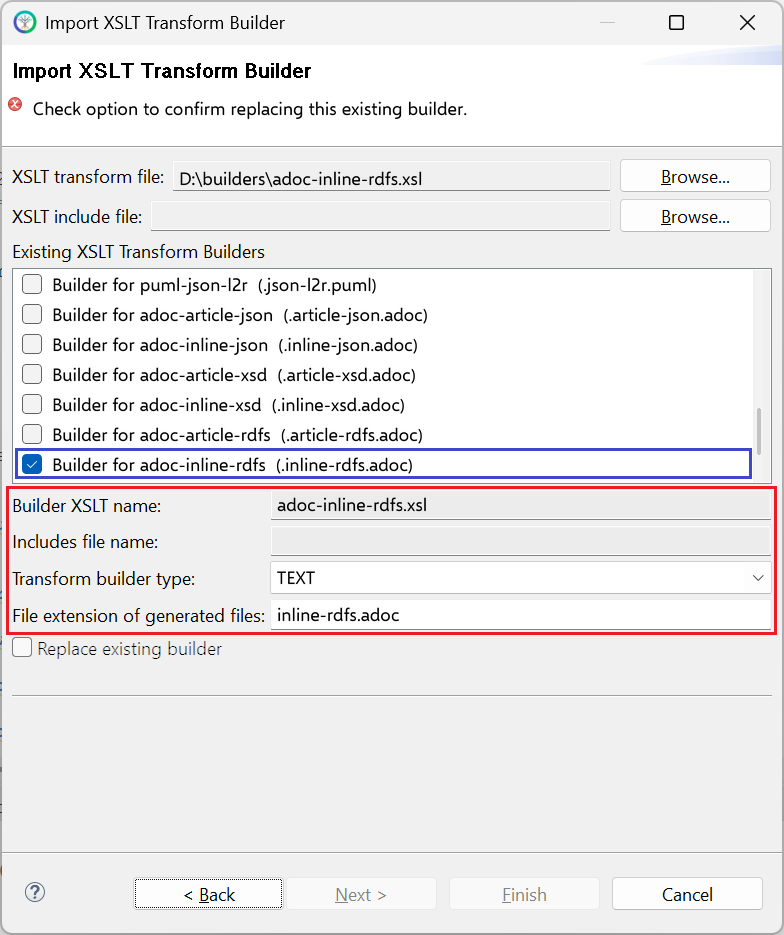
Given this builder ships with CIMTool the below screenshot highlights the existing NTE (Name/Type/Extension) settings for the builder. We strongly recommend that you do not import customized versions of this shipped builder over the original in your local CIMTool installation. Doing so will force regeneration of any existing builder-generated artifacts for projects in your workspace that have this builder enabled.
The recommended best practice is to rename the builder file (from adoc-inline-rdfs.xsl to custom-adoc-inline-rdfs.xsl for example) before importing. On import this will be interpreted as a new builder and you will be allowed to enter values in the Type and Extension fields.
NOTE: </br>CIMTool requires that file extensions be unique and will prevent you from entering an extension already assigned to a builder. This is because an artifact’s name is derived by concatenating the base name of the CIMTool
.owlprofile with the file extension assigned to the builder. Therefore, a unique file extension must be assigned to each builder when imported. The file extension for a builder can be modified later from within the “Maintain XSLT Transform Builders” screen.
License
This builder is released under the Apache 2.0 license and was developed under sponsorship of the UCAIug.